board-esp-mosaico Reference
ESP-Mosaico, an ESP32-S31 development kit by Espressif with a 480x480 AMOLED touch display, 16 MB of flash, and 16 MB of octal PSRAM. ESP32-S31 support is in beta. See the ESP32 Guide for more information.
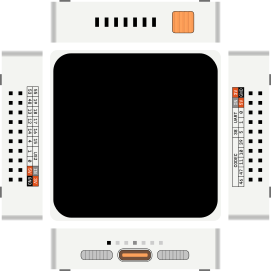
Pin names
The pins of the two module slots are named after their GPIO numbers, e.g. pin 55 is GPIO55.
| Name | Description |
|---|---|
Numbered pins (e.g. 4, 55) | Digital GPIO pins |
0.1, 0.2 | GPIO0 * |
1.1, 1.2 | GPIO1 * |
TX0, RX0 | GPIO58, GPIO59 (UART0) |
USJ_DN, USJ_DP | GPIO33, GPIO34 (USB Serial/JTAG) |
3V3.1, 3V3.2 | 3.3V power supply * |
5V.1, 5V.2, VIN.1, VIN.2 | 5V power supply * |
GND.1, GND.2 | Ground * |
* Pins ending with .1 are on the left module slot, pins ending with .2 on the right module slot.
Display and touch
The board has a 480x480 AMOLED display with a CO5300 controller, connected over QSPI, and a CST9220 touch controller, connected over I2C (address 0x5A). They are wired inside the board, so you don't need to add them to your diagram. You can use them with Espressif's esp_lcd_co5300 and esp_lcd_touch_cst9220 drivers.
| Signal | GPIO |
|---|---|
| Display CLK / CS | 42 / 50 |
| Display D0 / D1 / D2 / D3 | 36 / 51 / 35 / 9 |
| Display TE | 43 |
| Display + touch reset | 44 |
| Touch SDA / SCL / INT | 56 / 3 / 6 |
To touch the display in the simulator, click on it with the mouse, or drag the mouse while holding the button.
Simulation features
This table summarizes the current status of the board features:
| Feature | Status | Notes |
|---|---|---|
| Display | ✔️ | RGB565 pixels. Brightness control and rounded corners not simulated |
| Touch | ✔️ | Up to two touch points |
| Buttons | ❌ | |
| Audio | ❌ | |
| IMU | ❌ | |
| Vibration motor | ❌ |
Legend:
✔️ Simulated
🟡 Partial implementation/work in progress
❌ Not implemented
Serial Monitor
To view the output of UART0 in the Serial Monitor, add the following connections to your diagram.json file:
  "connections": [
    [ "$serialMonitor:RX", "esp:TX0", "", [] ],
    [ "$serialMonitor:TX", "esp:RX0", "", [] ],
    …
  ]
The example assumes that the board was defined with an id of "esp".
Building the firmware
ESP32-S31 firmware requires ESP-IDF v6.1 or newer, where the ESP32-S31 is a preview target (idf.py --preview set-target esp32s31). The Wokwi web editor can't compile ESP32-S31 projects yet, so build the firmware on your computer, and run it with Wokwi for VS Code or the Wokwi CLI. Arduino and MicroPython don't support the ESP32-S31 yet.