board-mfrc522 RFID Reader
MFRC522 RFID/NFC reader module with SPI interface for reading 13.56 MHz MIFARE cards and tags.
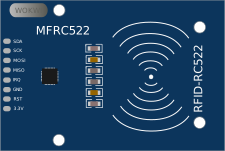
Pin names
| Name | Description |
|---|---|
| 3.3V | Voltage supply (3.3V) |
| RST | Reset (active low) |
| GND | Ground |
| IRQ | Interrupt request (active low) |
| MISO | SPI data out |
| MOSI | SPI data in |
| SCK | SPI clock |
| SDA | SPI chip select (active low) |
Attributes
| Name | Description | Default value |
|---|---|---|
| uid | Custom UID (for Blue Card only) | "" |
UID format
The UID can be specified in the following lengths:
- 4 bytes:
01:02:03:04(MIFARE Classic) - 7 bytes:
04:11:22:33:44:55:66(MIFARE Ultralight)
Each byte must be two hexadecimal characters (00-FF), separated by colons.
Card presets
The simulator provides built-in card presets for quick testing. Click on the MFRC522 to open the control panel where you can select a card:
| Index | Preset | Color | UID | Card Type |
|---|---|---|---|---|
| 0 | Blue Card | Blue | 01:02:03:04 | MIFARE Classic 1K |
| 1 | Green Card | Green | 11:22:33:44 | MIFARE Classic 1K |
| 2 | Yellow Card | Yellow | 55:66:77:88 | MIFARE Classic 1K |
| 3 | Red Card | Red | AA:BB:CC:DD | MIFARE Classic 1K |
| 4 | NFC Tag | Gray | 04:11:22:33:44:55:66 | MIFARE Ultralight |
| 5 | Key Fob | Orange | C0:FF:EE:99 | MIFARE Mini |
The uid attribute only affects the Blue Card (index 0). Other cards always use their preset UIDs. This lets you customize your main card while keeping the others for multi-user testing.
Controlling the reader
The control panel provides two ways to present a card:
- Tap button - Presents the card briefly (500ms), simulating a quick tap
- Hold switch - Keeps the card presented until you toggle it off
This allows testing both tap-and-go scenarios and scenarios where the card needs to stay on the reader.
Keyboard shortcuts
Click on the control panel to focus it, then use these shortcuts:
| Key | Action |
|---|---|
b | Select Blue Card |
g | Select Green Card |
y | Select Yellow Card |
r | Select Red Card |
n | Select NFC Tag |
k | Select Key Fob |
t | Tap (present card briefly) |
Using the MFRC522
The MFRC522 communicates via SPI (Mode 0) and is commonly used with the MFRC522 library by Miguel Balboa or the Arduino_MFRC522v2 library.
Common use cases:
- Access control systems
- Attendance tracking (multi-user)
- Smart home door locks
- NFC tag reading projects
Arduino code example
The example below uses the MFRC522 library to detect and read card UIDs. On ESP32, the default SPI pins are used with GPIO 5 for chip select and GPIO 21 for reset.
#include <SPI.h>
#include <MFRC522.h>

#define SS_PIN  5
#define RST_PIN 21

MFRC522 rfid(SS_PIN, RST_PIN);

void setup() {
  Serial.begin(115200);
  SPI.begin();
  rfid.PCD_Init();
  Serial.println("MFRC522 Ready");
  Serial.println("Scan a card...");
}

void loop() {
  if (!rfid.PICC_IsNewCardPresent()) {
    return;
  }

  if (!rfid.PICC_ReadCardSerial()) {
    return;
  }

  Serial.print("Card UID:");
  for (byte i = 0; i < rfid.uid.size; i++) {
    Serial.print(rfid.uid.uidByte[i] < 0x10 ? " 0" : " ");
    Serial.print(rfid.uid.uidByte[i], HEX);
  }
  Serial.println();

  rfid.PICC_HaltA();
  delay(1000);
}
Arduino Uno wiring
| MFRC522 | Arduino Uno |
|---|---|
| VCC | 3.3V |
| RST | 9 |
| GND | GND |
| MISO | 12 |
| MOSI | 11 |
| SCK | 13 |
| SDA | 10 |
ESP32 wiring
| MFRC522 | ESP32 |
|---|---|
| VCC | 3.3V |
| RST | GPIO 21 |
| GND | GND |
| MISO | GPIO 19 |
| MOSI | GPIO 23 |
| SCK | GPIO 18 |
| SDA | GPIO 5 |
Automation controls
The MFRC522 reader can be controlled using Automation Scenarios. It exposes the following controls:
| Control | Type | Description |
|---|---|---|
| card | int | Card preset index (0-5, see table) |
| tagPresent | int | 1 to present card, 0 to remove |
Example scenario: Multi-user attendance
The following scenario tests an attendance system with multiple cards:
name: Attendance System Test
version: 1

steps:
  - wait-serial: 'System Ready'

  # Select Blue Card and present it
  - set-control:
      part-id: rfid1
      control: card
      value: 0

  - set-control:
      part-id: rfid1
      control: tagPresent
      value: 1

  - wait-serial: 'Welcome, Alice'

  # Remove card
  - set-control:
      part-id: rfid1
      control: tagPresent
      value: 0

  - delay: 500ms

  # Select Red Card (unauthorized)
  - set-control:
      part-id: rfid1
      control: card
      value: 3

  - set-control:
      part-id: rfid1
      control: tagPresent
      value: 1

  - wait-serial: 'Access Denied'
Simulator examples
- MFRC522 Basic Reading - Basic RFID card detection with ESP32